
Conflict Sets
A conflict set is ABDiff’s repository-level view of all unmerged files in a Git working tree. In the app this appears as the Conflicts sidebar.
Instead of resolving conflicts one file at a time in separate windows, you can inspect the full set from one place and move between files quickly.
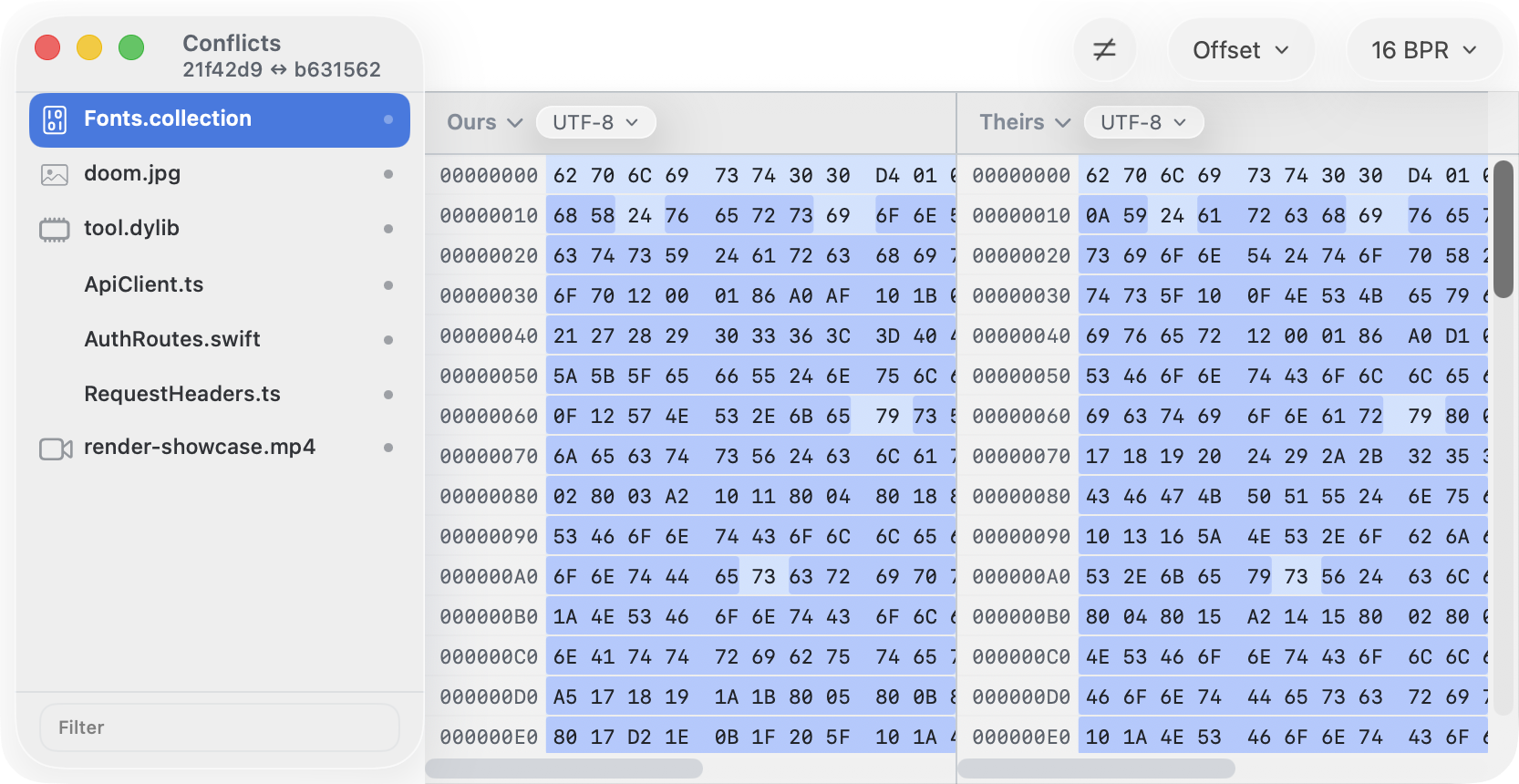
To open it from the terminal
git mergetoolAnother way:
abd conflicts
abd conflicts /path/to/repo-or-file
abd conflicts --repo /path/to/repo
Layout
- The left sidebar lists unmerged paths in the repository.
- When Git exposes both merge sides, the subtitle at the top shows the two conflicting revisions as short hashes.
- Selecting a row opens the matching detail view on the right.
- Text files open in the three-way merge view.
- Images, videos, Mach-O binaries, and other binary files open in the matching comparison view.
- The footer filter narrows the visible list by file name, relative path, or file kind.
Moving Through Conflicts
When the Conflicts sidebar has focus:
- Press Up Arrow or Down Arrow to move through the visible rows. The detail view changes to the selected file.
- Press Return or Space to activate the selected row.
- Press Right Arrow to move keyboard focus into the detail view when the selected file supports embedded keyboard navigation.
- From a keyboard-focused text, binary, or Mach-O detail view, press Left Arrow to return focus to the conflicts sidebar.
Filtering changes the rows that the arrow keys move through. If the current selection is filtered out, the next arrow or activation uses the first visible row.
Row Menu
Right-click any row to open the row menu:
- Resolve with Ours writes the ours side to the conflicted file and marks that row resolved.
- Resolve with Theirs writes the theirs side to the conflicted file and marks that row resolved.
- Mark Resolved keeps the current working-tree contents and marks the row resolved.
- Discard Merge Draft appears only when the row has an unsaved text merge draft.
- Show File Info opens metadata for that conflicted file.
Resolved rows remain visible with a checkmark. Their row menu still offers the resolve actions, so you can change the chosen resolution before finishing the Git merge.
When ABDiff Uses It
If Git launches ABDiff for a conflicted file and the repository still has more than one unmerged path, ABDiff can host that file inside the Conflicts shell instead of opening a standalone merge window. The requested file is preselected so you can continue immediately.
You can also open the same repository-level view directly from Terminal:
abd conflicts
abd conflicts /path/to/repo-or-file
abd conflicts --repo /path/to/repo
Resolving Files
- For text conflicts, only the Result pane is editable.
- Use Resolve with Ours or Resolve with Theirs from the merge view, or use the file-level actions from the sidebar row menu.
- Use File > Refresh Conflicts to re-read the repository conflict state after external changes.
- Save the file to write the resolved result back to disk.
Empty State
When the repository no longer reports unmerged entries, ABDiff keeps the shell open and shows that there are no unmerged files left.