
ABDiff incluye una herramienta de linea de comandos
(abd) para abrir comparaciones/merges y para comparaciones
de imagenes en CI.
Instalacion
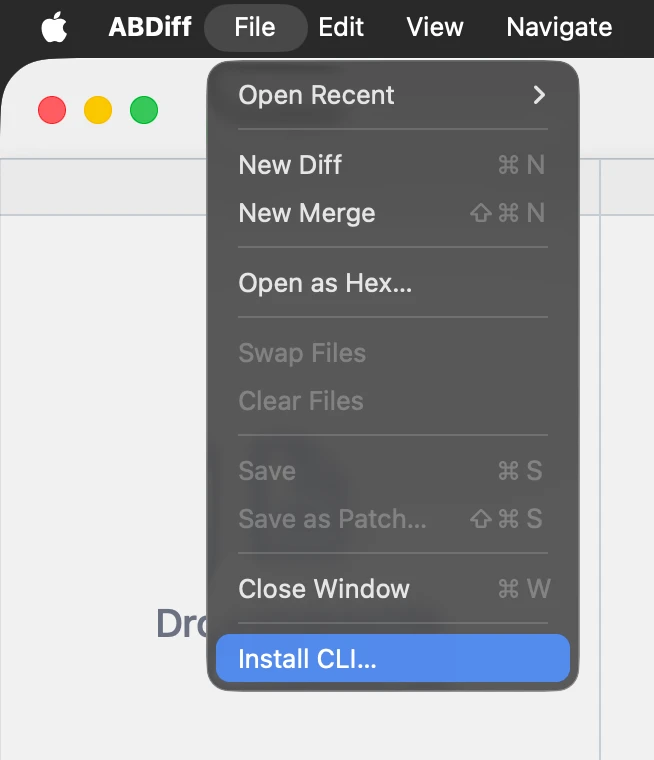
- Elige Archivo ▸ Instalar CLI….
- Elige una carpeta de instalacion.
- Anade esa carpeta a tu
PATHpara queabdeste disponible en Terminal.
Editar PATH
Como anadir una carpeta al PATH:
- Edita el archivo de inicio de tu shell.
nano ~/.zshrc- Anade esta linea y guarda:
export PATH="$HOME/installation/folder:$PATH"- Recarga el archivo o reinicia la shell.
source ~/.zshrcUso rapido de la CLI
Estos son algunos ejemplos habituales.
# Open one file in the app
abd left.txt

# Open two files (ABDiff infers viewer mode)
abd left.txt right.txt

# Print CLI version
abd version

# Explicit two-way compare
abd --local left.txt --remote right.txt

# Explicit three-way merge
abd --base Base.txt --local Ours.txt --remote Theirs.txt --result Merged.txt

# Compare images in CI (no UI)
abd image left.png right.png --metric ssim --threshold 0.98

# Launch without blocking
abd --no-wait left.txt right.txt
abd image imprime una puntuacion y sale con
0 cuando las imagenes son parecidas dentro del umbral, o
con 1 cuando son diferentes.